








How to Set Up Debrid Mode in Stremize
Debrid Mode allows Stremize to search and stream high-quality sources using Debrid services.
You can configure Debrid Mode from the Stremize website or directly from the Stremize mobile app. Both methods use the same account settings and will automatically sync across your devices.
To access Debrid streams, your setup should include the following:
- at least one Debrid service connected to your account
- at least one community add-on recommended by Stremize
- optionally, a Trakt connection for syncing watch history and lists (metadata is provided by TMDB by default)
Stremize recommends configuring your Debrid service on the website for easier and faster setup.
1. Open the Add-ons Section
Open the Add-ons section in the Stremize app or dashboard.
From here you can manage Debrid services, community add-ons, and optional integrations.
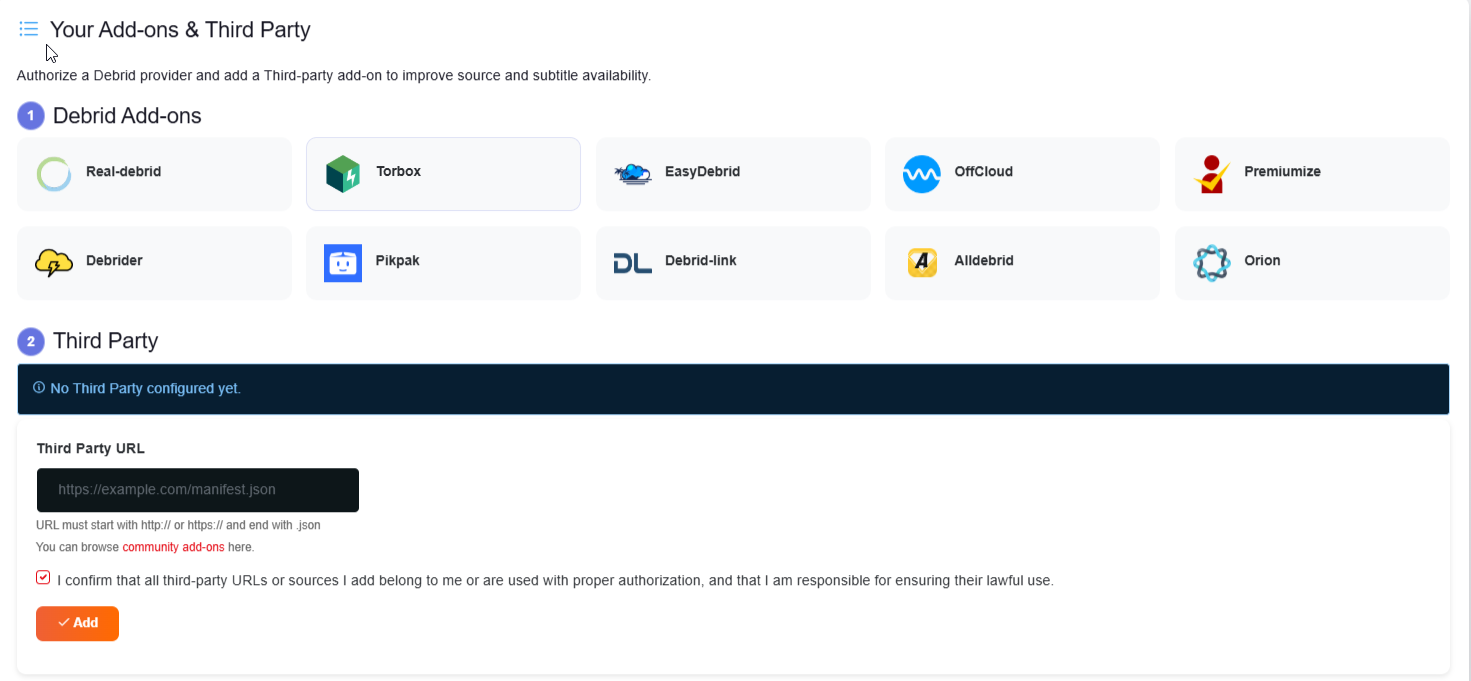
2. Connect a Debrid Service
Choose the Debrid service you want to connect and follow the instructions to authorize the connection.
Once connected, the service will appear in your Debrid list.
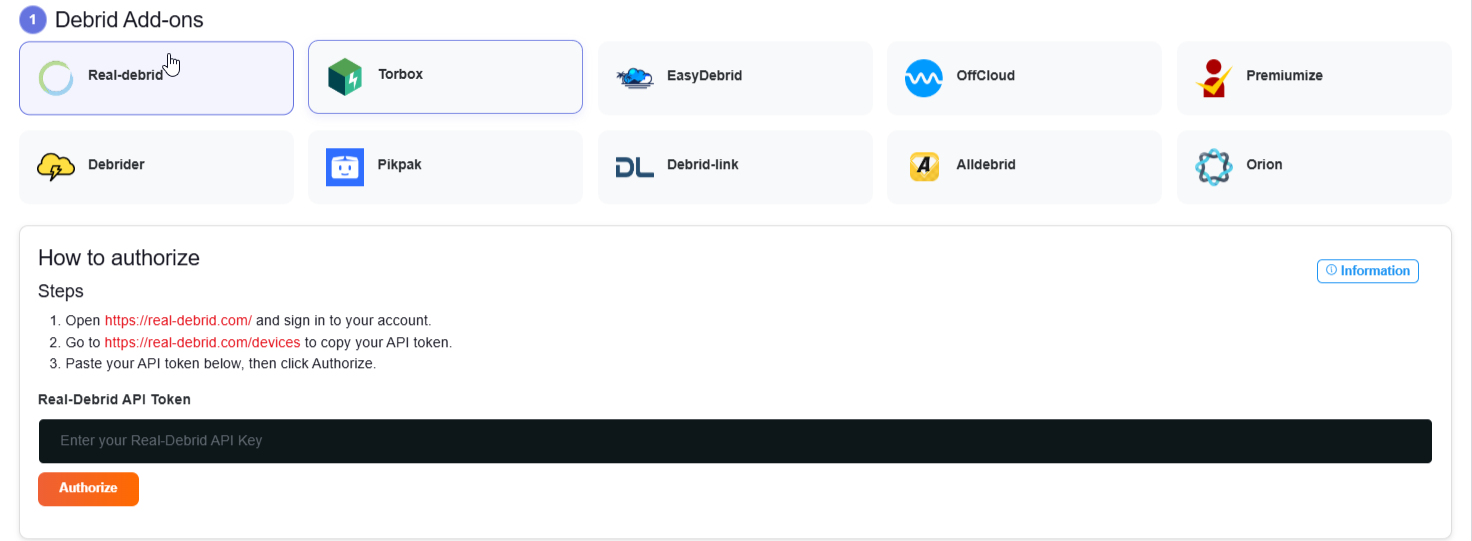
Real-Debrid : How to authorize
- Open https://real-debrid.com/ and sign in to your account.
- Go to https://real-debrid.com/devices to copy your API token.
- Paste your API token below, then click Authorize.
Torbox : How to authorize
- Open TorBox Account Setting https://www.torbox.app/settings?section=account. Need sign in or sign up first.
- Click Copy API Key and paste it below, then click Authorize. You need upgrade Torbox account to ESSENTIAL, STANDARD or PRO to use API key. Torbox free account not supported.
Easy Debrid : How to authorize
- Open EasyDebrid panel and sign in.
- Copy your API Key and paste it below, then click Authorize.
Offcloud : How to authorize
Enter your credentials in the format email:password when authorizing OffCloud.
Your login details are encrypted and securely stored, used only for authentication, and are never shared or logged outside the app.
Premiumize : How to authorize
- Open https://www.premiumize.me/ and sign in to your account.
- Go to Account Settings and find the API section to generate or copy your API key.
- Paste your API key below, then click Authorize.
Debrider : How to authorize
- Open https://www.debrider.app/ and sign in to your account.
- Go to Account Settings and find the API section to generate or copy your API key.
- Paste your API key below, then click Authorize.
Pikpak : How to authorize
Enter your credentials in the format email:password when authorizing PikPak.
Your login details are encrypted and securely stored, used only for authentication, and are never shared or logged outside the app.
Debrid-link : How to authorize
- Open https://debrid-link.com/ and sign in to your account.
- Go to your account settings and find the API section to generate or copy your API key.
- Paste your API key below, then click Authorize.
Alldebrid : How to authorize
- Open https://alldebrid.com/ and sign in to your account.
- Go to API Keys to generate or copy your API key.
- Paste your API key below, then click Authorize.
Orion : How to authorize
- Open https://panel.orionoid.com/ and sign in.
- Copy your API Key from the dashboard and paste it below, then click Authorize.
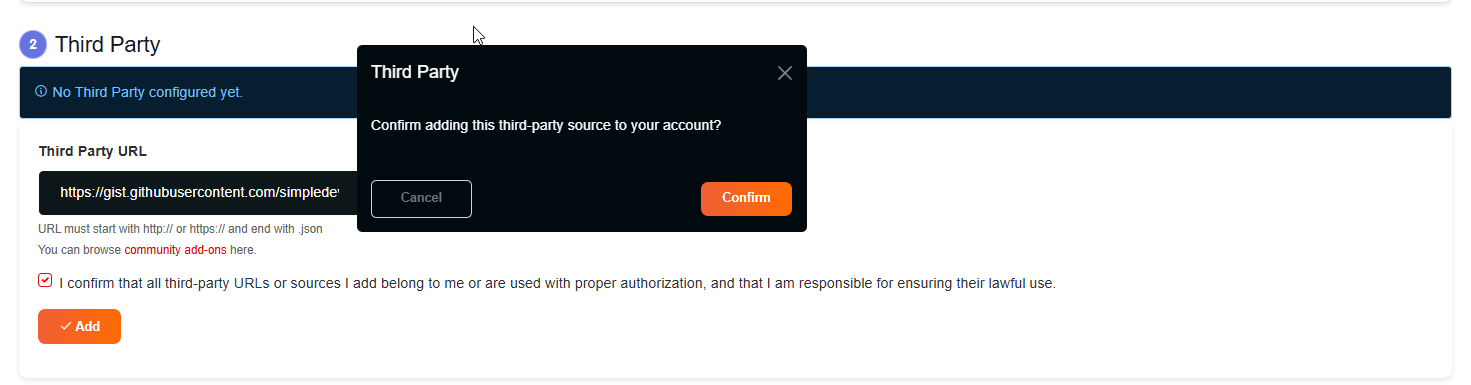
3. Install a Community Add-on
Debrid streams are discovered through community add-ons.
Open the recommended add-ons list and install at least one source suggested by Stremize.
These add-ons allow Stremize to search for available streaming links.
Hit Copy Addon then back to Account Config
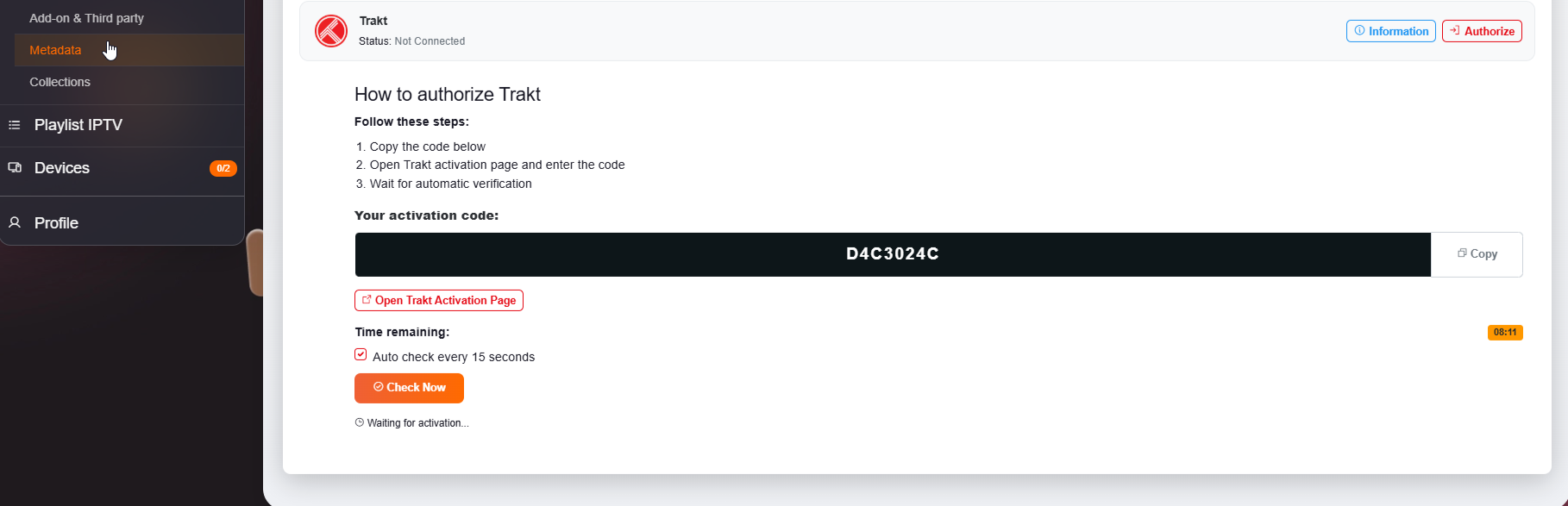
4. Optional: Connect Trakt
If you want to sync your watch history and watchlists, you can connect Trakt.
This step is optional. Stremize already uses TMDB metadata by default for movie and TV information.
Trakt : How to authorize
- Copy the code in your config dashboard
- Open Trakt activation page and enter the code
- Wait for automatic verification
5. Start Using Debrid Mode
Once your Debrid service and add-ons are configured, open the Discover section in the Stremize app.
You can now search for movies or TV shows and Stremize will retrieve available Debrid streams automatically.