








How to connect Premiumize in Stremize App
Premiumize Connection Guide
Premiumize allows Stremize to retrieve cached streaming sources for movies and TV shows. Once connected, Stremize can automatically search for available streams using supported community add-ons.
This guide explains how to connect your Premiumize account to Stremize step by step.
Before You Start
- You must have a Premiumize account.
- Your account must be active to access streaming sources.
- Debrid services can be authorized using the Stremize Web Dashboard or directly from the Stremize mobile app.
- For easier setup, Stremize recommends configuring Debrid services on the web dashboard.
Step 1. Sign in to Premiumize
Open the Premiumize website and sign in to your account.
Step 2. Open Account Settings
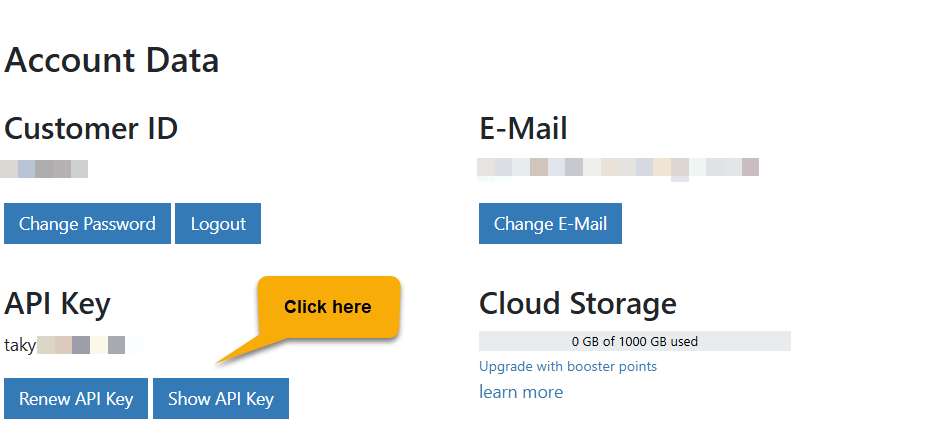
After signing in, open your Account settings and locate the API section. This section allows applications like Stremize to connect to your account.
Step 3. Copy Your API Key
Locate your API key Section then click "Show API Key" button and copy it.
Make sure the entire key is copied correctly without additional spaces.
Step 4. Authorize Premiumize in Stremize
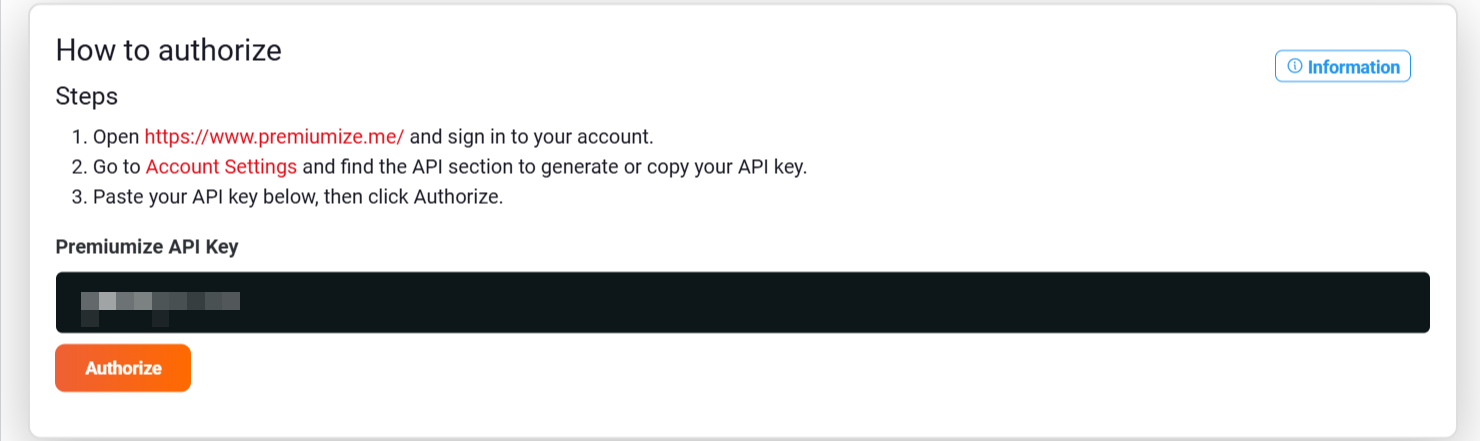
Open the Add-ons section in the Stremize Web Dashboard or in the Stremize mobile app.
Paste your Premiumize API key into the authorization field and click Authorize.
Step 5. Confirm the Connection
Once authorization is successful, Premiumize will appear in your Debrid services list.
Stremize can now use Premiumize to retrieve streaming sources.
Common Issues
Invalid API key
Make sure the API key was copied correctly from the Premiumize account settings page. Remove any extra spaces before pasting it into Stremize.
Account not active
Premiumize must have an active subscription to return streaming sources.
No streams found
Debrid services work together with community add-ons. If no sources appear, make sure at least one supported add-on is installed in Stremize.
Next Step
After connecting your Debrid service, open the Discover section in the Stremize app and search for a movie or TV show.
Stremize will automatically retrieve available streaming sources using your connected Debrid service.