








How to connect Torbox in Stremize App
Torbox Connection Guide
Torbox allows Stremize to retrieve cached streaming sources for movies and TV shows. Once connected, Stremize can automatically search for available streams using supported community add-ons.
This guide explains how to connect your Torbox account to Stremize step by step.
Before You Start
- You must have a Torbox account.
- Your account must have an ESSENTIAL, STANDARD, or PRO plan. Torbox free accounts do not support API access.
- Debrid services can be authorized using the Stremize Web Dashboard or directly from the Stremize mobile app.
- For easier setup, Stremize recommends configuring Debrid services on the web dashboard.
Step 1. Sign in to Torbox
Open the Torbox website and sign in to your account.
Step 2. Open Account Settings
After signing in, open your account settings page.
https://www.torbox.app/settings?section=account
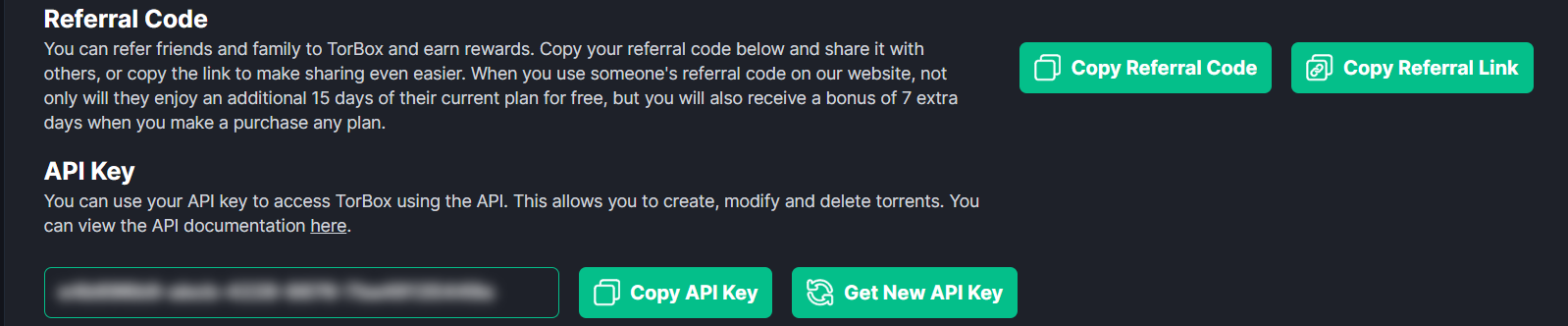
This section contains your API key used for connecting applications like Stremize.
Step 3. Copy Your API Key
Locate the API Key field and click the copy button.
Make sure the entire key is copied correctly before continuing.
Step 4. Authorize Torbox in Stremize
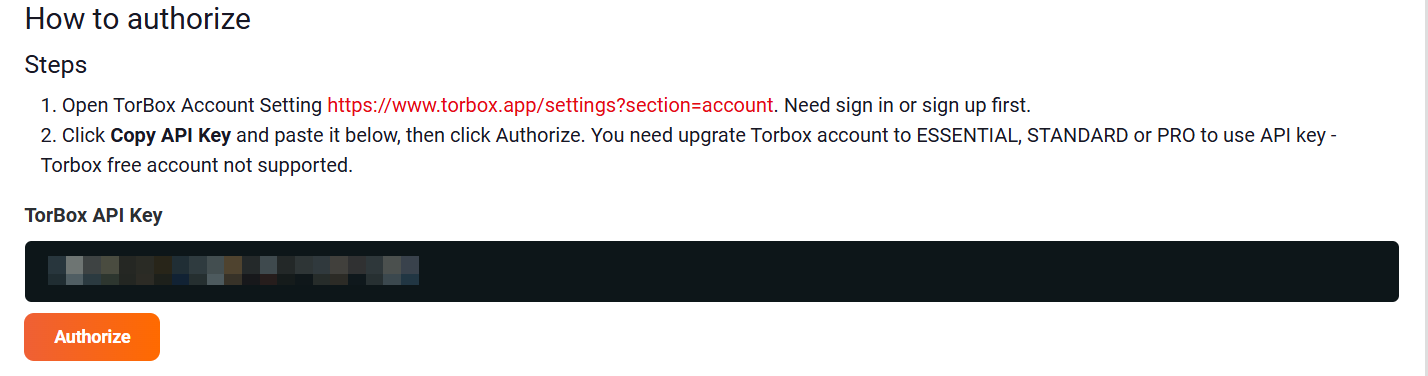
Open the Add-ons section in the Stremize Web Dashboard or in the Stremize mobile app.
Paste your Torbox API key into the authorization field and click Authorize.
Step 5. Confirm the Connection
Once authorization is successful, Torbox will appear in your Debrid services list.
Stremize can now use Torbox to retrieve streaming sources.
Common Issues
API key not working
Make sure the API key was copied correctly from the Torbox account settings page. Remove any extra spaces before pasting it into Stremize.
Free account limitation
Torbox free accounts do not support API access. You must upgrade to an ESSENTIAL, STANDARD, or PRO plan before connecting Torbox to Stremize.
No streams found
Debrid services work together with community add-ons. If no sources appear, make sure at least one supported add-on is installed in Stremize.
Next Step
After connecting your Debrid service, open the Discover section in the Stremize app and search for a movie or TV show.
Stremize will automatically retrieve available streaming sources using your connected Debrid service.